
Where should I look for an AI label on YouTube?
On YouTube, look below a long-form video player and on the video overlay for a Short, then open the full description. YouTube’s May 2026 update moved labels for photorealistic and meaningfully AI-altered or generated content into those more visible positions. Disclosures for unrealistic animation or slight alterations may still sit in the expanded description.
YouTube says creators must disclose realistic AI use, and its systems may automatically label significant photorealistic AI content. A permanent label can also come from YouTube’s own tools or C2PA metadata indicating fully generative AI. The company adds an important limit: the label by itself does not change how a video is recommended or whether it can earn money.
A missing label settles very little. Clearly unrealistic animation and minor edits do not always require disclosure, and a creator can fail to disclose required use. Treat the label as the first piece of evidence rather than a pass or fail result.
What seven checks help identify an AI-generated kids video?
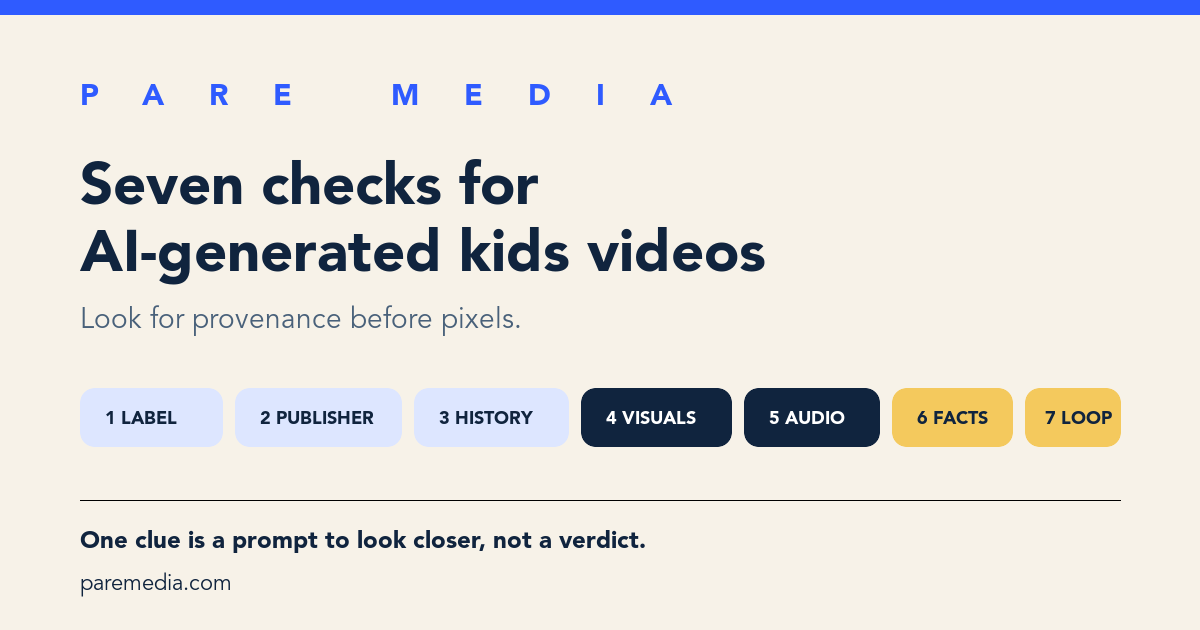
Seven checks give a parent a repeatable review: disclosure, publisher, channel history, visual continuity, audio continuity, factual consistency, and commercial repetition. Each check asks a different question, so one clue does not carry the whole decision.
The National Institute of Standards and Technology says digital transparency can provide information about a file’s origin and history, but “does not guarantee” trustworthiness. NIST also says no provenance, labeling, or detection technique solves the whole problem by itself. That is why the checklist mixes source evidence with a review of the actual video.
| Check | What to inspect | What the result can tell you |
|---|---|---|
| 1. Disclosure | Player label, Short overlay, and expanded description | A stated or platform-detected use of AI |
| 2. Publisher | Named studio, educator, broadcaster, or accountable creator | Who stands behind the video and can correct it |
| 3. Channel history | About page, oldest uploads, cadence, and topic changes | Whether the channel has a coherent record or appeared at scale |
| 4. Visual continuity | Hands, text, object count, clothing, shadows, and scene geography | Production errors that justify a closer look, not proof by themselves |
| 5. Audio continuity | Lip sync, pronunciation, speaker identity, room sound, and abrupt voice shifts | Whether narration and images belong to the same production |
| 6. Factual consistency | Names, dates, instructions, cause and effect, and cited sources | Whether the video can support an educational claim |
| 7. Commercial repetition | Repeated plots, thumbnails, product prompts, and nearly identical uploads | Whether volume or selling pressure appears to drive the channel |
Which visual and audio clues deserve a closer look?
Visual and audio discontinuities deserve a closer look when several appear in the same video. Pause at a scene change and count stable objects: fingers, toy parts, letters on a sign, buttons on clothing, or characters in the room. Resume and see whether those details persist. Watch for reflections or shadows that move against the scene.
Listen with the picture out of view for 20 seconds. Synthetic or heavily assembled narration may switch pronunciation, emphasis, breathing, room tone, or speaker identity. Then watch the mouth and action. Delayed lip movement and sound effects that miss the visible action can reveal weak assembly, though ordinary dubbing can create the same symptoms.
Compression, low budgets, stop-motion, translated audio, and experimental animation can all look strange without generative AI. Avoid accusing a creator from one malformed frame. Write down two or three timestamps and continue to the publisher and disclosure checks.
How should I inspect the channel and publisher?
Channel history shows whether a publisher has an accountable body of work. Open the About page, sort or scroll toward older uploads, compare the newest ten thumbnails, and look for a named organization or creator with a consistent subject. A sudden jump from unrelated content into dozens of near-identical children’s videos deserves more review.
High output is a clue only when paired with repetition or missing accountability. A real newsroom, animation team, classroom publisher, or archive may publish often. The useful questions are who made this, what process they disclose, and whether someone corrects mistakes.
YouTube’s monetization policy says original and authentic content should avoid being mass-produced, generic, repetitive, or manipulative. That policy governs monetization rather than family suitability, but its channel-level review points are useful: main theme, most-viewed videos, newest videos, metadata, and the About section. The ten-minute channel evaluation uses a similar sample across time.
How can I test a video that claims to teach something?
Test an educational claim by checking one name, one number, and one instruction against a dependable source. A science video might identify an animal, state a measurement, and show an experiment. Verify those three items before treating the episode as teaching material.
Imagine a seven-minute craft video with 14 steps. The supply list names white glue, but step 6 suddenly uses hot glue without mentioning adult help. The finished model has five pieces even though the child cut four. At 5:40, the narrator calls a square a rectangle after using the terms correctly earlier. Those three inconsistencies do not identify the production tool, but they are enough to reject the tutorial as instructions.
Production origin and usefulness remain separate judgments. A disclosed AI-assisted animation can be careful and accurate. A fully human-made video can contain unsafe directions. Before a child follows any demonstration, use the video tutorial safety check to review the activity and materials apart from the screen.
Can I score the seven checks without pretending it is an AI detector?
A simple 0-to-14 review score can decide how much work a video needs without estimating the probability that AI made it. Give each of the seven checks 0 points when the answer is clear, 1 when information is incomplete, and 2 when there is a concrete concern. The total measures review friction, not machine authorship.
For example, a video has a clear AI disclosure (0) and names a publisher (0). The channel is two weeks old with 80 similar uploads (2), object counts change (2), audio stays consistent (0), one fact lacks support (1), and a product prompt repeats six times (2). The result is 7 out of 14. Use that score to review closely or choose another video. It says nothing about an “AI percentage.”
Use 0 to 2 as a quick ordinary review, 3 to 5 as a closer review, and 6 or more as a reason to pause approval until the questions are resolved. A single serious issue, such as dangerous advice or impersonation, overrides the total.
- 0 points: the check is clear and accountable
- 1 point: information is incomplete or inconsistent
- 2 points: there is a specific unresolved concern
- 0 to 2 total: ordinary review
- 3 to 5 total: closer review
- 6 to 14 total: pause approval
Should I approve an AI-generated video or the whole channel?
Approve only the reviewed video when the channel’s process, ownership, or consistency remains unclear. A good episode proves something about that episode. It gives little evidence about 80 other uploads made from the same template.
The video-versus-channel approval guide recommends matching the size of approval to the size of the review. That rule fits synthetic media well because tools and production practices can change quickly inside one channel. Set a review point after a few uploads rather than assuming the label and quality will stay fixed.
PARE’s video approval workflow lets a caregiver make that narrower decision for a paired child. Approval remains the caregiver’s judgment. A disclosure label, a low checklist score, or a familiar publisher can inform the judgment, but none supplies it.
Common questions
Does YouTube label every AI-generated kids video?
No. YouTube requires disclosure for realistic, meaningfully altered or generated content and may add labels automatically, while some unrealistic animation and minor edits may place disclosure only in the description or require none.
Do strange hands or bad lip sync prove a video is AI-generated?
No. They are clues that justify a closer look. Compression, dubbing, low-budget animation, and ordinary editing mistakes can create similar effects.
Is AI-generated video automatically bad for children?
No. Review accuracy, purpose, commercial pressure, and fit for the child. Production method and quality are separate decisions.
What should I do when a channel hides who made its videos?
Keep approval to the exact video you reviewed, check the channel history and claims, and choose an accountable publisher when important questions remain unanswered.
Sources and further reading
- Improving AI labels for viewers and creators, YouTube Blog
Source for the May 2026 label locations, automatic detection signals, C2PA handling, and the limit of disclosure labels.
- YouTube channel monetization policies, YouTube Help
Source for YouTube’s inauthentic-content language and the channel areas its reviewers may inspect.
- Reducing Risks Posed by Synthetic Content, National Institute of Standards and Technology
Source for the limits of provenance, labeling, and detection and the value of combining methods in context.