
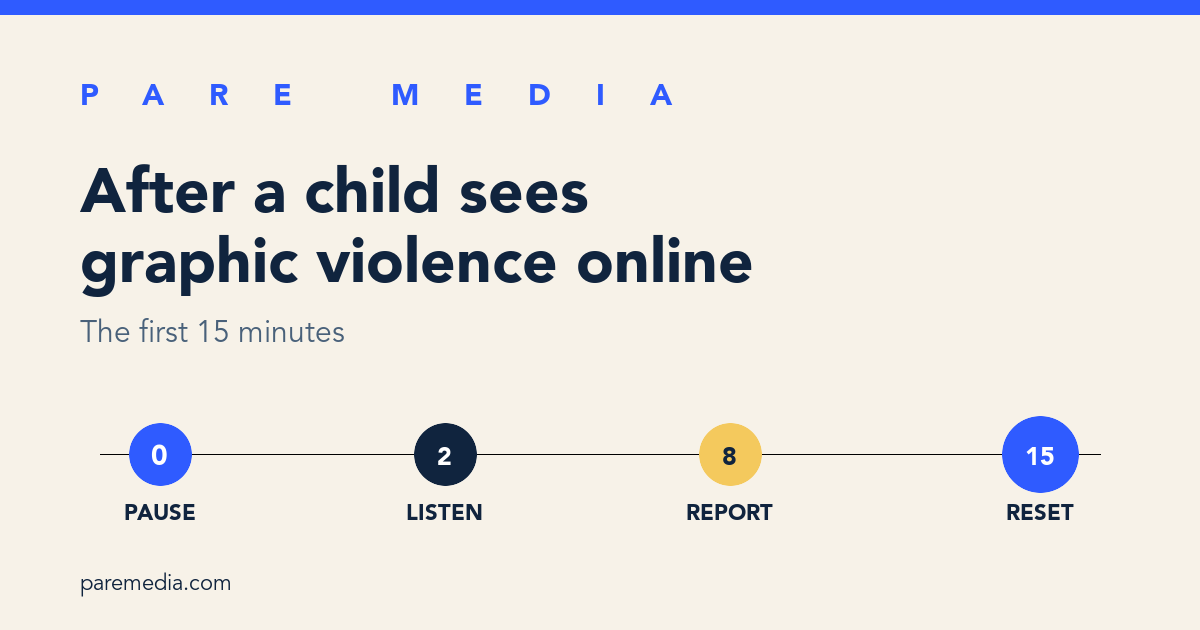
What should I do in the first two minutes?
In the first two minutes after a child sees graphic violence online, close or cover the content and say, “You’re not in trouble. I’m here.” Take the device without grabbing or blaming. Turn off autoplay, leave the feed, and stop any download or message that could send the clip to somebody else.
Keep your own face and voice steady. The Australian eSafety Commissioner advises caregivers to “stay calm and reassure” because the adult’s response sets the tone. Its 2025 advisory also says to pause the platform or device and stop a child from replaying the clip.
Do a quick safety check before discussing the post. Ask whether the child knows anyone shown, whether the clip included a threat toward them or their school, and whether another person is still sending it. If there is a credible and immediate threat to a person, contact local emergency services. Ordinary platform reporting can wait a few minutes while immediate safety cannot.
- 0:00 to 0:30: cover or close the clip
- 0:30 to 1:00: stop autoplay, downloads, and sharing
- 1:00 to 2:00: reassure the child and check for an immediate threat
How do I ask what my child actually saw?
A short, child-led check tells you enough to choose the next step. Try: “Was it real, acted, animated, or hard to tell?” Then ask, “Did it appear by itself, did someone send it, or did you search for it?” Those two answers reveal the likely source without asking the child to replay the scene in their mind.
Avoid demanding names, colors, injuries, or a frame-by-frame story. A child may remember more later, and silence in the first conversation does not prove they are fine or hiding something. The eSafety Commissioner recommends open questions such as “What did you see?” and “How did it make you feel?” while letting children lead.
Name uncertainty honestly. You can say, “I don’t know yet whether that was real. It was disturbing, and you did the right thing by stopping.” If your child wants to argue that the clip was fake or harmless, the guide to handling disagreement over a video review keeps the conversation specific without giving up the boundary.
Should I save evidence before reporting a gore video?
Save identifying details for a report, but avoid saving or circulating the graphic media itself. Write down the platform, account or channel name, post URL, date and approximate time, and how the clip reached the child. After reporting, record the case number or take a screenshot of the confirmation screen if it contains no graphic frame.
Do not ask the child to reopen the clip so you can capture a better screenshot. Do not forward the media to a family group, school group, or another parent as proof. Reposting expands the audience and may expose more people. The same consent habit used when a child wants to share a friend’s photo matters even more when someone is hurt or identifiable.
There are exceptions that need specialized reporting. If the material appears to involve child sexual abuse, use the official reporting route in your country, such as the National Center for Missing & Exploited Children CyberTipline in the United States, and do not download or redistribute it. If a platform or authority asks for specific evidence, follow its directions rather than creating extra copies yourself.
Which report, mute, or block control should I use?
Use report for the harmful post, mute for topics or accounts you do not want recommended, and block when a person or account can contact the child again. The labels vary by service, so the decision matters more than the button name. A report asks the platform to review content under its rules; it does not guarantee removal.
The eSafety Commissioner reports that 22 percent of children ages 10 to 17 have seen extreme real-life violence online. Its response guidance groups five useful actions together: mute, report, block, step away, and talk to a trusted adult. The table turns those actions into a platform-neutral sequence.
| What happened | Control to use | What to record |
|---|---|---|
| One disturbing post appeared in a feed | Report the post, choose violent or graphic content, then hide or mute it | Post URL, account name, date, report confirmation |
| An account repeatedly posts or recommends similar clips | Mute or block the account, then report representative posts | Account URL and two or three post URLs, without downloading media |
| A person sent the clip directly | Report the message and block the sender after preserving identifiers | Sender handle, message URL or timestamp, report confirmation |
| A credible threat names a person, school, or place | Leave the content closed and contact local emergency services | Exact threat text, account, URL, and time |
What should I do during the rest of the 15 minutes?
During the remaining minutes, finish the report, change the immediate feed conditions, and help the child return to the room around them. Offer water, a light on, a familiar activity, or quiet company. Let them choose whether they want to talk now, later, or with another trusted adult.
Here is a worked example. At 4:12 p.m., a 10-year-old receives a graphic clip in a group message. By 4:14, the parent has closed it and blocked replay. By 4:18, the child has said it came from an unfamiliar account and no threat named them. By 4:24, the parent has recorded the handle and message time, submitted one report, blocked the sender, and removed the downloaded preview. At 4:27, they agree to check in after dinner. The response takes 15 minutes without asking the child to view the clip again.
After the immediate response, inspect the path that delivered the video. Tighten who can message the account, clear the specific recommendation if the platform allows it, and review autoplay or sensitive-content controls. For planned viewing, a small approved video library can reduce open-feed browsing, though no approved list controls what arrives in every messaging app.
When should I seek more support for my child?
Seek more support when distress persists, disrupts sleep or school, or grows instead of easing. The eSafety Commissioner lists anxiety, nightmares, intrusive thoughts, avoidance, and distress around reminders among possible reactions to repeated or unexpected exposure. A single restless night does not provide a diagnosis, but a pattern deserves attention.
Check in once later that day and again over the next few days. Use a plain observation: “You seemed jumpy when the phone buzzed. Do you want to talk, change a setting, or sit with me while you use it?” Contact the child’s pediatrician, school wellbeing team, or a qualified mental-health professional if symptoms continue or interfere with daily life.
Keep the door open even if the child looks unaffected. Some children need words right away; others first show the impact through sleep, play, or avoidance. Your job is to make help easy to reach and to keep the graphic clip from becoming a test they must pass.
Common questions
Should I make my child tell me exactly what was in the gore video?
No. Ask enough to identify whether the clip was real, how it arrived, and whether anyone faces an immediate threat. Let the child choose how much detail to share.
How do I report gore videos without watching them again?
Use the post or message menu to report violent or graphic content, then record the URL, account name, date, and confirmation. Do not replay or forward the clip to collect more proof.
Will blocking one account stop violent videos from appearing?
Blocking stops that account from reaching the child on many services, but similar content can still arrive through recommendations, reposts, or other senders. Review feed, contact, autoplay, and sensitive-content settings too.
When is a disturbing video an emergency?
Treat it as an emergency when it contains a credible immediate threat to a person, school, or place, or when someone appears to be in current danger. Contact local emergency services and preserve identifiers without redistributing the media.
Sources and further reading
- Gore online: How violent content is reaching children and what you can do, eSafety Commissioner
Source for the 22 percent figure, possible reactions, and the recommended pause, report, block, and child-led response.
- Tips for Parents and Caregivers About Media Coverage of Traumatic Events, National Child Traumatic Stress Network
Additional guidance on reducing repeated exposure and helping children understand violent media.
- CyberTipline, National Center for Missing & Exploited Children
Official U.S. reporting route when content appears to involve child sexual exploitation.